

The big picture
Tealhand has one owner device, your phone, and any number of controlled computers. Each computer on your device list can also control your other computers from the Tealhand app, and let AI apps on it read them. Two optional servers sit between them. This page is the map. The next pages follow one thing through it each: a tap on a card, connecting a phone, the files, and the relays.
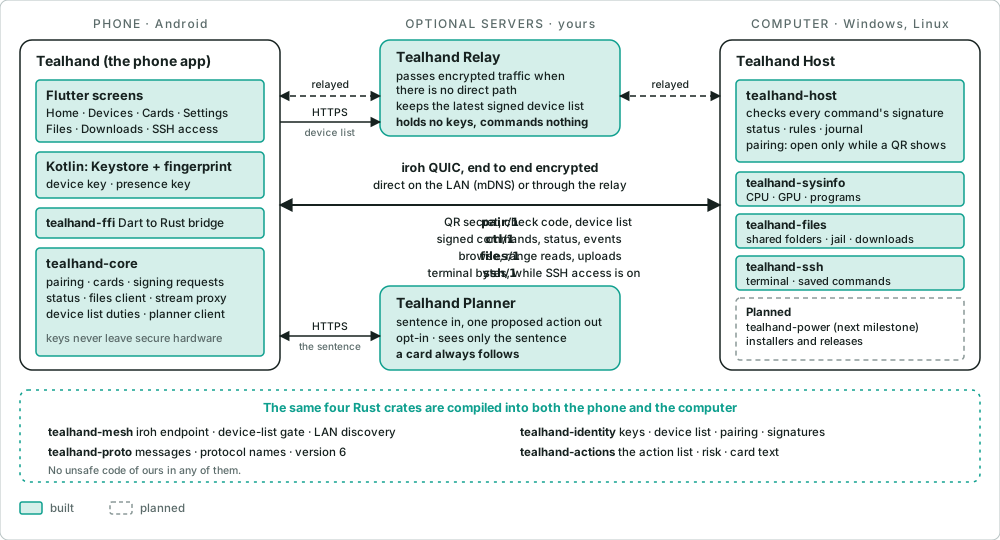
Green is built and dashed is planned. Every arrow says what it carries. Nothing in the middle can issue a command.
The devices
Section titled “The devices”| Where | What runs there | What it does |
|---|---|---|
| Your phone | Tealhand: Flutter screens, a small Kotlin layer for the Keystore and the fingerprint, and the Rust core | Asks, shows the card, signs the command with a key that never leaves the phone’s secure hardware |
| Each computer | Tealhand Host (tealhand-host) with tealhand-sysinfo and tealhand-files; with the Tealhand app, also its own client (tealhand-core in computer mode) |
Checks every command against the signed device list, runs it, keeps the rules and the activity journal, serves the shared folders. Its own client controls your other computers, signed with its iroh key, and serves read-only MCP tools to AI apps on 127.0.0.1 while you allow it |
| A server you run, optional | Tealhand Relay | Passes encrypted traffic when two devices can’t connect directly, and keeps the latest signed device list so it admits only your devices |
| A server, optional | Tealhand Planner | Turns a sentence into one proposed action. Only if you switch it on |
There is no central server that controls computers. The phone holds the key that signs the device list and its own commands; a computer on that list signs its commands with its own key. Each computer checks every signature against the list. How the pieces fit has the names and the keys.
The crates
Section titled “The crates”Four Rust crates are compiled into both the phone and the computer, so both ends agree on every message:
| Crate | What it holds |
|---|---|
tealhand-proto |
The messages, their framing, the protocol names and the version (7 today) |
tealhand-identity |
The keys, the signed device list, connecting a phone and signatures |
tealhand-mesh |
The iroh endpoint, the gate that turns away devices that are not on the device list, and LAN discovery |
tealhand-actions |
The one action list, with each action’s risk and card text |
On top of them: tealhand-core and tealhand-ffi on the phone, tealhand-host, tealhand-sysinfo and
tealhand-files on the computer (and tealhand-core again, as the computer’s own client). tealhand-e2e tests the phone’s core against the real Host. The full list, with
licences: Crates.
What each link carries
Section titled “What each link carries”| Link | Carries | Who can read it |
|---|---|---|
pair/1 |
The QR code’s one-time secret, the check code and the first device list. Open only while a QR code is on the computer’s screen, and the computer asks for a click too | The phone and the computer |
ctl/1 |
Commands signed by the phone or by another of your computers, their answers, status every 5 seconds, events such as a rule firing, a download finishing or another computer’s change, and the device list when it changes (from the phone only) | The two devices |
files/1 |
One signed opener, then browsing and reading of shared folders; every upload is its own signed request | The two devices |
ssh/1 |
Terminal bytes, after a signed opener. Only while SSH access is on at the computer | The two devices |
| To the relay | Encrypted packets it can’t open, and the signed device list it uses to admit only members | Nobody in between |
MCP on 127.0.0.1 |
An AI app’s tool calls on the same computer, with a token from the OS credential store. Only reads leave the computer, through its own client | Nothing leaves the computer except those reads |
| To the planner | Your sentence and your computers’ names. Back comes a proposed action that the phone checks again and shows as a card | The planner sees the sentence |
A direct connection between your phone and a computer is the normal case on the same network. Away from home the same encrypted connection goes through your relay. Either way, the relay sees only bytes it can’t read: Relays.
The five safety rules in the picture
Section titled “The five safety rules in the picture”- The AI, in the planner or in chat, can only propose actions from the fixed action list, and every action shows a card first.
- Risky actions need your fingerprint on the card (Windows Hello on a computer). Destructive actions never come from chat. Another of your computers has no fingerprint: the target’s own switches decide.
- Text from web pages, files or agents is data. It never becomes a command.
- A computer runs only commands signed by a device on your owner-signed list: your phone’s hardware keys, or one of your computers. The relay and the planner hold no keys at all.
- The hosted AI sees only your sentence, never the computer’s data.
On the network side, nothing on a computer listens except iroh’s one UDP socket, which only lets in devices on
the device list (and a phone being connected, while a QR code shows), and, only while you allow AI apps, the MCP
endpoint on 127.0.0.1. Each rule and how the code keeps it:
The five safety rules.
What is stored where
Section titled “What is stored where”- On the phone only: the keys, in secure hardware; the signed device list; each computer’s address. There is no account, no cloud and no backup of secrets. If you lose the phone, you forget it on each computer and connect the new one.
- On each computer: its own network key, the signed device list, the rules, the shared folders list and the journal, in the data folder. The journal never holds file contents, keys or the names of programs.
- On your relay: the newest signed device list for each owner you allow, which holds each device’s name, kind and public keys.
Where things stand
Section titled “Where things stand”Built and merged: the whole backend, including shared folders and files; the phone app (Home with Chat and Classic, the Inbox, Devices, cards, connecting, Settings, Files, Downloads and the terminal with saved commands); the Tealhand app on a computer, which also controls your other computers; and AI apps through MCP, read only. Planned: the installers and the power helper. Status of M1 is the exact list.